> ## Documentation Index
> Fetch the complete documentation index at: https://docs.nevermined.app/llms.txt
> Use this file to discover all available pages before exploring further.
# FAQ
> Frequently asked questions about Nevermined, card delegation, security certifications, Stripe Connect, Visa Agentic Tokens, and Stripe / Braintree settlement.
## Agent Payments
How agents pay with your real card, within limits you control.
The Nevermined App lets you enroll a Visa, Stripe, or Braintree card, set spending limits, and let agents charge it directly via x402. No checkout pages, no human in the loop. Manage everything at [nevermined.app](https://nevermined.app).
Only within the limits you set. When you create a delegation, you define a lifetime spending limit, maximum number of transactions, and duration. A per-card spending ceiling applies across all active delegations. The agent can only charge within these bounds, and you can revoke a delegation at any time. Visa delegations additionally require a one-time WebAuthn/passkey approval bound to those exact limits.
Not for card payments. Nevermined works with regular Visa, Mastercard, Amex, and Discover cards through Visa, Stripe, or Braintree, and those payments settle entirely on card rails — no wallet, no stablecoins.
A wallet is only needed if you choose to pay a plan priced in stablecoins. See [Stablecoin Payments](/docs/integrate/patterns/stablecoin-payments) for that path.
Card Delegation uses your real credit or debit card, not a separate prepaid balance. At enrollment, the card number is tokenized by a PCI-compliant vault (VGS Collect for Visa and Stripe; Braintree Drop-in for Braintree). Nevermined never sees or stores the raw PAN. What the agent receives is a scoped delegation that encodes identity, spending limits, and (for Visa) the device that approved it. The actual charge still runs on existing card rails, so it appears on your normal statement. No prefunding, no separate balance to manage.
The transaction is rejected instantly before it reaches the payment processor. Delegations are enforced server-side on every verify and settle call. The agent receives a clear 402 error explaining which limit was hit (lifetime spending limit, transaction count, or duration), so it can adapt its behavior or notify the user.
Yes. Any software that can make an HTTP request can use x402 payments. That includes OpenAI Assistants, Anthropic Claude, LangChain, CrewAI, Strands, MCP tool servers, and custom agents. Nevermined also provides TypeScript and Python SDKs, a CLI, and an MCP server for convenience, but none are required.
One click in the [dashboard](https://nevermined.app) or `DELETE /api/v1/delegation/{delegationId}`. Revocation is immediate: no grace period, no cached tokens, and no pending window. The agent loses payment capability the instant you revoke, and any in-flight verify/settle calls fail with `DELEGATION_INACTIVE`.
From the agent's perspective, nothing changes. It sends the same x402 payment header either way. The difference is in how settlement runs under the hood:
* **Visa path** — Your card is tokenized as a Visa Agentic Token via the VGS Credential Management Platform. Each delegation is bound to your device with a one-time WebAuthn/passkey ceremony enforced by Visa VTS. Settlement runs through Stripe Connect against the seller's connected account.
* **Stripe path** — Your card is tokenized by Stripe, and settlement runs through Stripe PaymentIntents directly. The seller connects their Stripe account when they enroll with Nevermined.
* **Braintree path** — Your card is vaulted as a Braintree `paymentMethodToken`, and settlement runs through `transaction.sale` against the seller's per-currency OAuth-connected Braintree merchant account.
In all three cases, sellers enroll with Nevermined to accept agent payments. Nevermined handles the x402 protocol, agent authentication, delegation enforcement, and settlement on their behalf.
## Security & Certifications
Independent audits, and where to read them.
Card data is captured via a PCI-compliant vault (VGS Collect for Visa / Stripe, Braintree Drop-in for Braintree) and tokenized before it enters the system. Nevermined holds ISO/IEC 27001:2022 certification and a SOC 2 Type II report, and operates at PCI SAQ-D level. For Visa, Strong Customer Authentication via WebAuthn/passkey (or email OTP fallback) is enforced **per delegation** by Visa VTS. Every transaction is logged with agent ID, amount, merchant, and timestamp for full auditability. See [Certifications](/docs/products/payments/certifications) for the full picture.
Yes. Nevermined has completed a **SOC 2 Type II** audit and is certified against **ISO/IEC 27001:2022**. Both are published on the [Trust Center](https://trustcenter.nevermined.ai), along with 67 controls under continuous monitoring.
Type I evaluates whether controls are **designed** correctly at a single point in time. Type II evaluates whether those controls **operated** effectively across a period, with evidence for each one. Nevermined holds Type II.
Both are available through the [Trust Center](https://trustcenter.nevermined.ai). The control list and engagement letter are public; the SOC 2 Type II report, the ISO/IEC 27001:2022 certificate, and the Data Management Policy are released under NDA via **Request access**.
Yes. Start with the [Trust Center](https://trustcenter.nevermined.ai) — it carries the certifications, the control list, and the policies most questionnaires ask for. For anything it doesn't cover, including bespoke questionnaires and DPAs, [contact the team](https://www.nevermined.ai/contact-us/).
Nevermined operates at PCI SAQ-D level. See [Card Enrollment](/docs/products/payments/card-enrollment) for how the vault tokenizes your card before it reaches us.
## Delegation Selection
How agents pick which delegation to charge.
There are three ways the system resolves which delegation to charge, from simplest to most explicit:
1. **Automatic** — If your API key has access to exactly one active delegation, it is selected automatically. Just pass your API key and go. If there are zero or multiple delegations, you get a clear error asking you to be more specific.
2. **Key-linked** — Link a specific delegation to a specific API key, either when you create the delegation or by revoking and recreating it. The system always routes that key to its linked delegation, even if you have multiple delegations active. Only the linked key can use that delegation.
3. **Explicit delegation ID** — Pass `delegationId` in `delegationConfig` for full control. This is the only supported mode for Visa.
See [Delegation Selection](/docs/products/payments/mandate-selection) for the full resolution algorithm.
If you have one delegation and one API key, you don't need to link them. Automatic selection handles it. Linking becomes useful when you have multiple delegations and want each agent (or API key) to use a specific one without passing a delegation ID on every request. It's the recommended approach for multi-agent setups on Stripe and Braintree, and a useful convenience for Visa.
The automatic selection will fail because the system can't determine which delegation to charge. Your agent receives a 402 error explaining that multiple delegations are available. You can resolve this by either linking your API key to a specific delegation, or passing the `delegationId` explicitly.
Yes. API keys are provider-agnostic. The same key works for delegations on any network. The link is stored as `apiKeyId` directly on the delegation record, so each delegation independently decides whether to honor the caller's key.
Delegations are immutable. To change the link, revoke the existing delegation and create a new one with the desired `apiKeyId`. For Visa, this also requires a fresh WebAuthn/passkey device-binding ceremony.
## Stripe
Settlement through Stripe's network.
When you enroll a card via Stripe, VGS Collect tokenizes the PAN and Stripe vaults it as a `pm_…` PaymentMethod. When your agent makes a payment, Nevermined creates an off-session PaymentIntent against that PaymentMethod, optionally routing to the seller's Stripe Connect account. The payment is wrapped in the x402 protocol, so the seller (or a facilitator) triggers the flow by responding with a 402 status code.
The seller enrolls with Nevermined and connects their Stripe account via Stripe Connect. Once enrolled, they can receive payments from AI agents via the x402 protocol. The seller needs an active Stripe account since the Stripe path settles through Stripe's network. Nevermined handles agent authentication, delegation enforcement, and the x402 flow on the seller's behalf.
Stripe supports most Visa, Mastercard, American Express, and Discover cards. Both credit and debit cards are eligible. The card is tokenized at enrollment and charges appear on your normal statement.
## Visa Agentic Tokens
Settlement through Visa's Trusted Agent Protocol.
Production-ready. Nevermined integrates with the Visa Trusted Agent Protocol through the VGS Credential Management Platform (CMP) and Visa VTS device-binding service. Your enrolled card becomes a Visa Agentic Token bound to Nevermined as the token requestor, and every delegation captures a fresh WebAuthn/passkey approval before it can charge.
At enrollment, your real PAN is captured by a VGS Collect iframe and posted directly to CMP. It never passes through or is stored by Nevermined. CMP mints a Visa Agentic Token (`vat_…`) bound to Nevermined as the token requestor. Even if the token were compromised, it can't be used outside the Nevermined ecosystem, and you can revoke it instantly from the dashboard.
Every Visa delegation requires a one-time WebAuthn/passkey ceremony — an iframe embedded by Visa VTS prompts you to approve the spending limit, duration, and merchant. Approving produces a single-use `assuranceData` blob that binds the delegation to your device. This means even if an agent is compromised, it can't widen its own spending power without your hardware key. It's purpose-built for high-frequency, autonomous agent payments.
Visa VTS falls back to an email OTP delivered to the address on file for your CMP cardholder. The webapp surfaces an OTP input when the SDK reports `needsOtp: true`.
The seller must have completed Stripe Connect onboarding — Visa delegations settle through Stripe Connect against the seller's connected account. The seller does not need any direct relationship with Visa or VGS; Nevermined acts as the token requestor. Visa delegations also require a `planId` so the delegation binds to a single seller per the Trusted Agent Protocol.
No. Visa delegation creation requires `consumerPrompt` and `assuranceData`, both of which can only be produced by the WebAuthn ceremony embedded in the Nevermined webapp. The SDK and CLI surface explicit errors (`BCK.VISA.0014`) when callers attempt `create_delegation(provider="visa", ...)`. You can, however, **consume** an existing Visa delegation from the SDK by passing its `delegationId` to `DelegationConfig` exactly like Stripe or Braintree.
Any Visa card whose issuer participates in the Visa Trusted Agent Protocol. During the pilot, support is concentrated on US issuers; the eligibility list is widening as more issuers integrate.
## Limits & Seller Onboarding
Pilot ceilings, increased limits, and accepting agent payments.
During the pilot, each enrolled card has a \$10.00 cumulative ceiling across all active delegations. This applies to all three networks independently. Individual delegation amounts are validated against the remaining ceiling at creation time.
Yes. The \$10 ceiling is a pilot default. Contact the Nevermined team to request increased limits for your account.
Contact the Nevermined team to schedule a seller onboarding call. Once enrolled, your business can accept payments from AI agents via the x402 protocol. Sellers on Stripe complete Stripe Connect; sellers on Braintree complete OAuth Connect with at least one child merchant account per accepted currency. Visa Trusted Agent plans require the seller's Stripe Connect account because Visa delegations settle through Stripe Connect.
No. Agents pay on real card rails (Visa, Mastercard). If a merchant accepts cards today, they already accept agent payments. No new SDK, no new settlement flow.
## Stripe Connect
Nevermined uses [Stripe Connect](https://stripe.com/connect) to route fiat payments directly to your Stripe account. You need to connect a Stripe account before you can receive credit card payments from your users.
**Stripe Connect** is for *builders* receiving fiat payouts. You connect your Stripe account so Nevermined can route revenue to you.
**Card delegation** is for *users* who want agents to pay with their card. The user enrolls a card, creates a spending delegation, and agents charge against it via x402.
They serve different sides of the transaction: Stripe Connect handles payouts to builders, card delegation handles card-based payments from users.
Open the [Nevermined App](https://nevermined.app) and navigate to **Settings > User Profile**. Scroll down to the **Stripe** section.
Click the **Connect Stripe** button. This opens Stripe's onboarding flow where you'll set up or link your Stripe account.
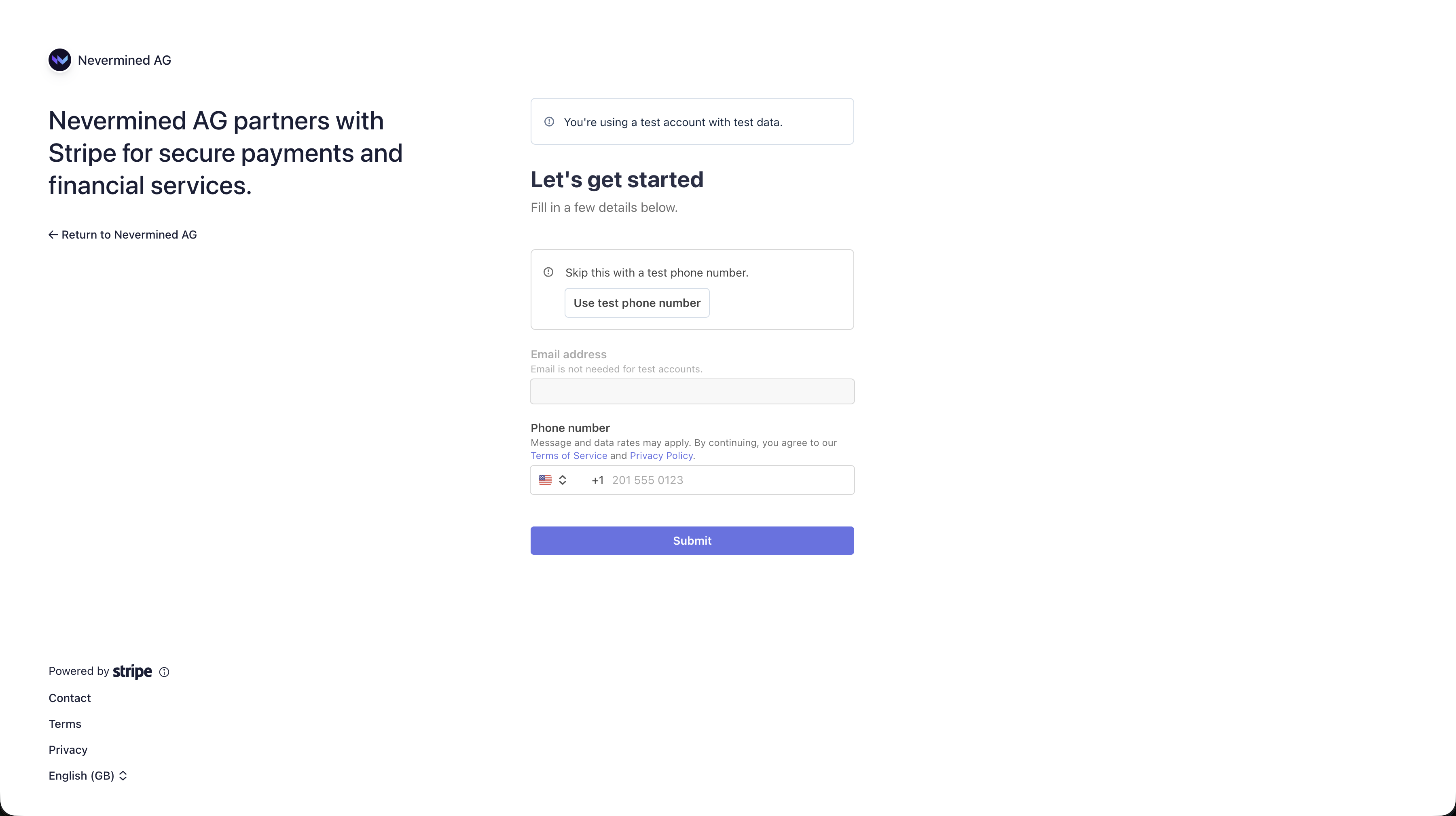
In the sandbox environment, you'll see a banner saying "You're using a test account with test data." Click **Use test phone number** to skip SMS verification.
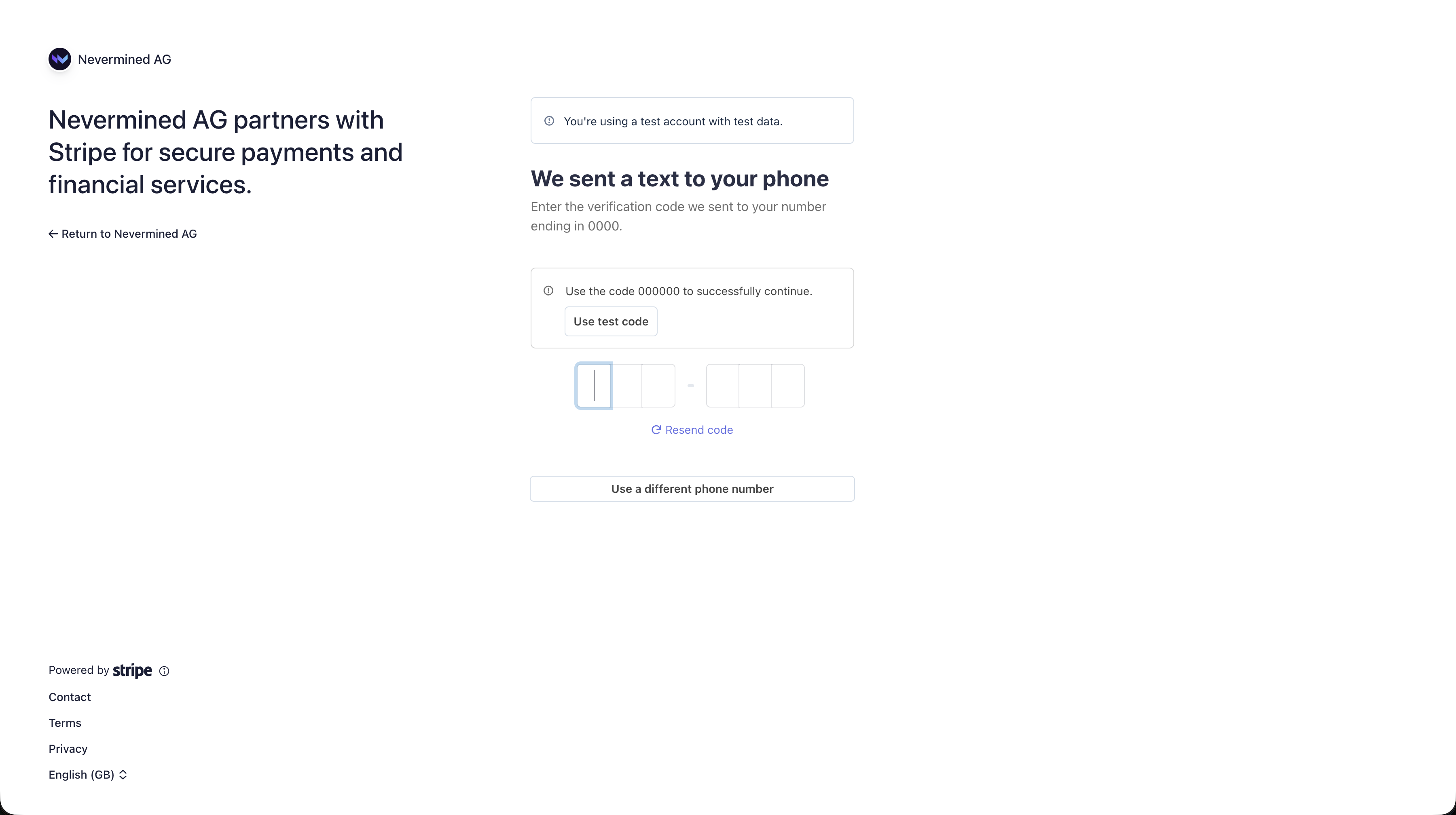
 Click **Use test code** to auto-fill the test code `000000` and continue.
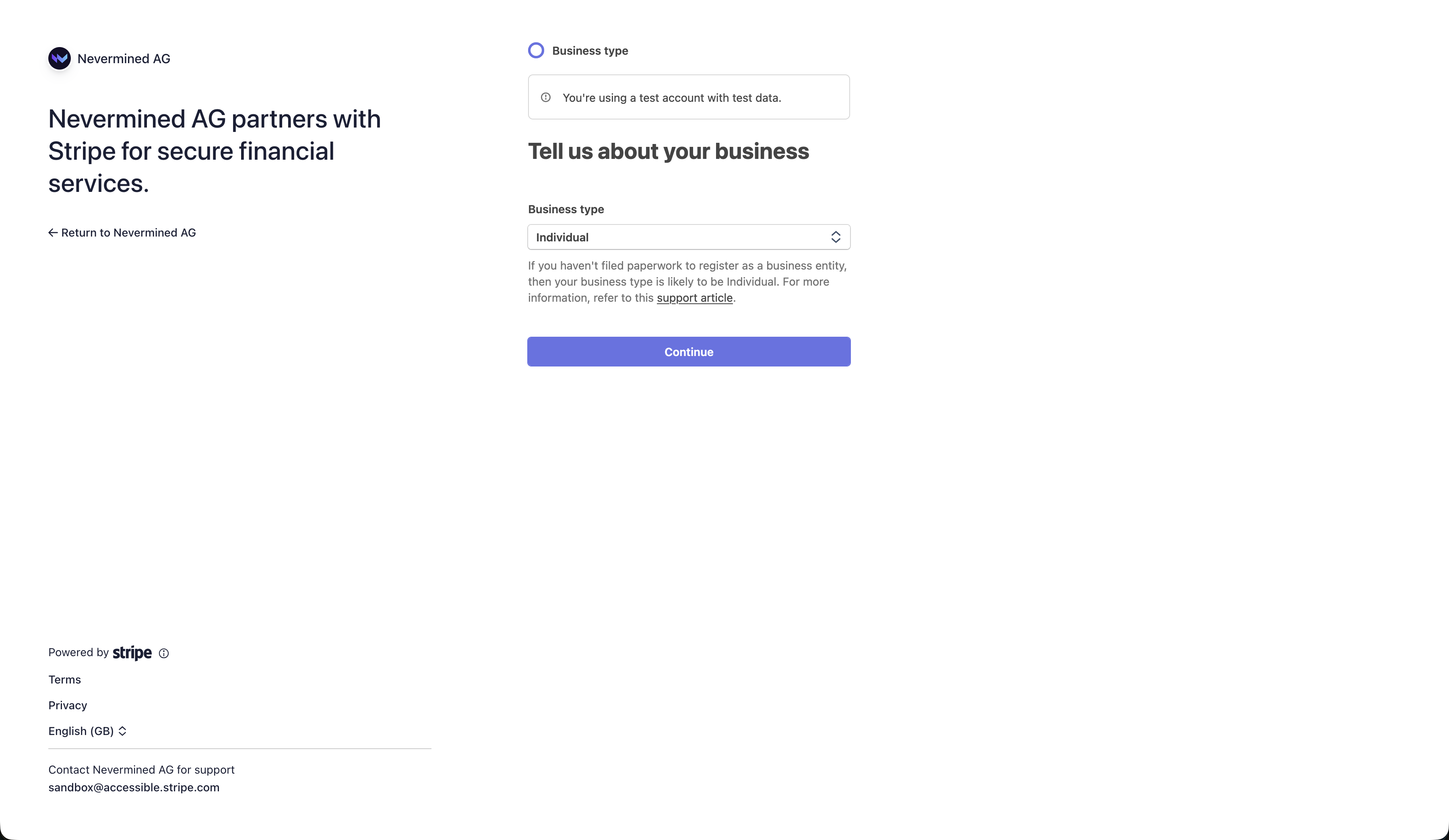
 Select **Individual** from the business type dropdown and click **Continue**.
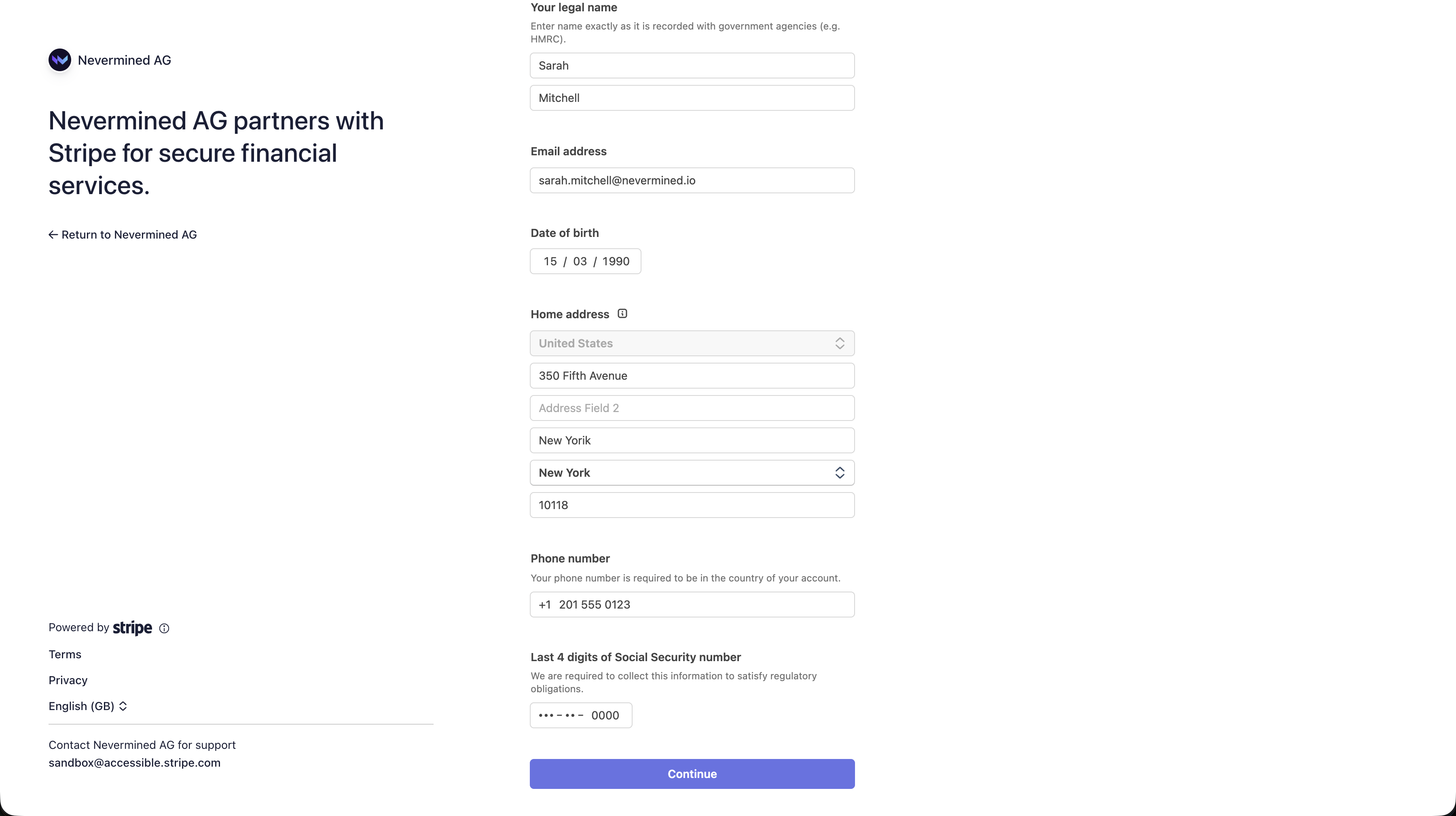
 Use these test values:
| Field | Test value |
| ---------------- | ------------------ |
| Legal first name | `Sarah` |
| Legal last name | `Mitchell` |
| Date of birth | `15 / 03 / 1990` |
| Address | `350 Fifth Avenue` |
| City | `New York` |
| State | `New York` |
| Zip code | `10118` |
| Last 4 SSN | `0000` |
Use `0000` for the last 4 digits of SSN. Any other value may trigger Stripe's additional identity verification flow.
Use these test values:
| Field | Test value |
| ---------------- | ------------------ |
| Legal first name | `Sarah` |
| Legal last name | `Mitchell` |
| Date of birth | `15 / 03 / 1990` |
| Address | `350 Fifth Avenue` |
| City | `New York` |
| State | `New York` |
| Zip code | `10118` |
| Last 4 SSN | `0000` |
Use `0000` for the last 4 digits of SSN. Any other value may trigger Stripe's additional identity verification flow.
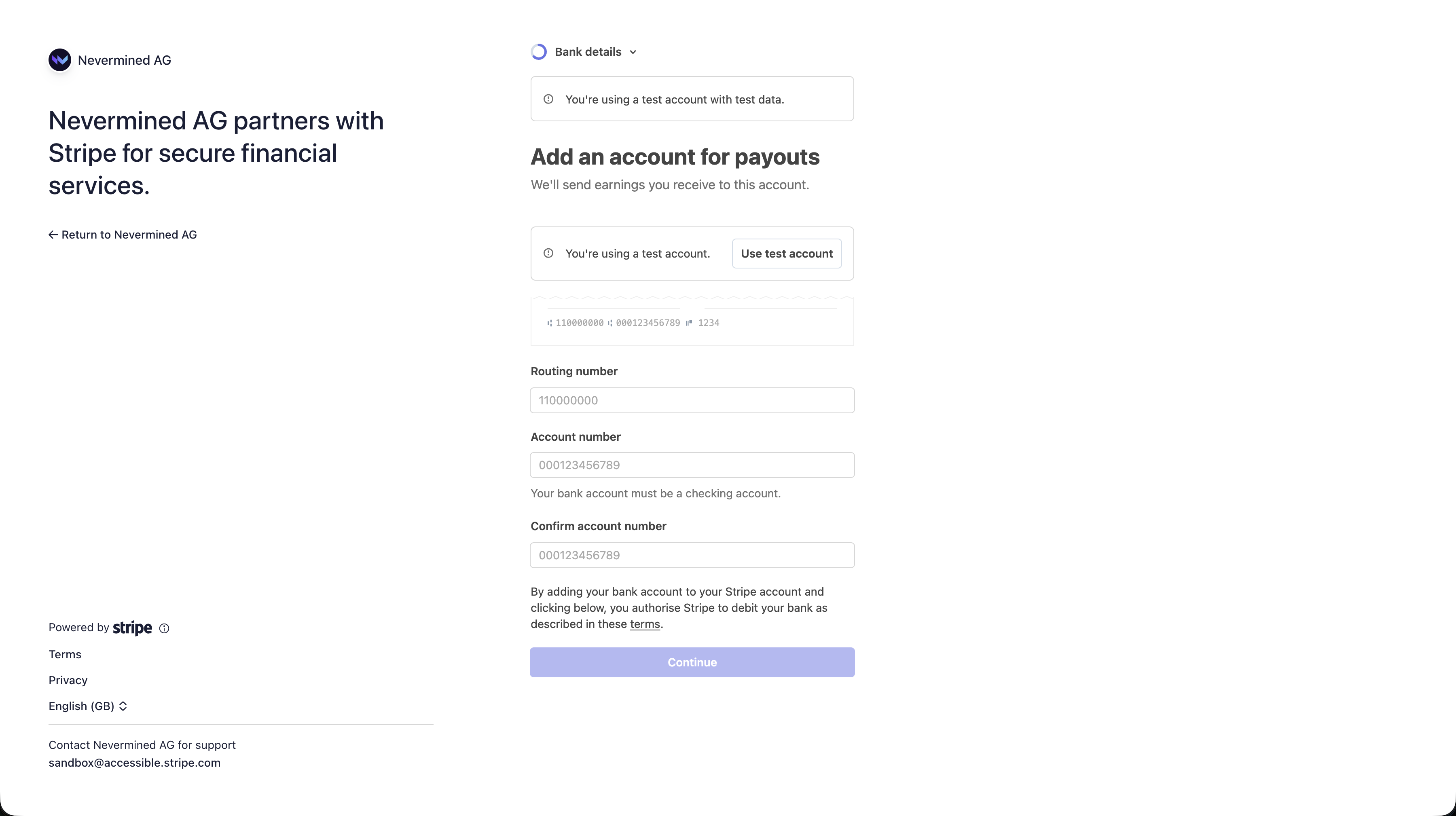
 Click **Use test account** to auto-fill the test routing number (`110000000`) and account number (`000123456789`), then click **Continue**.
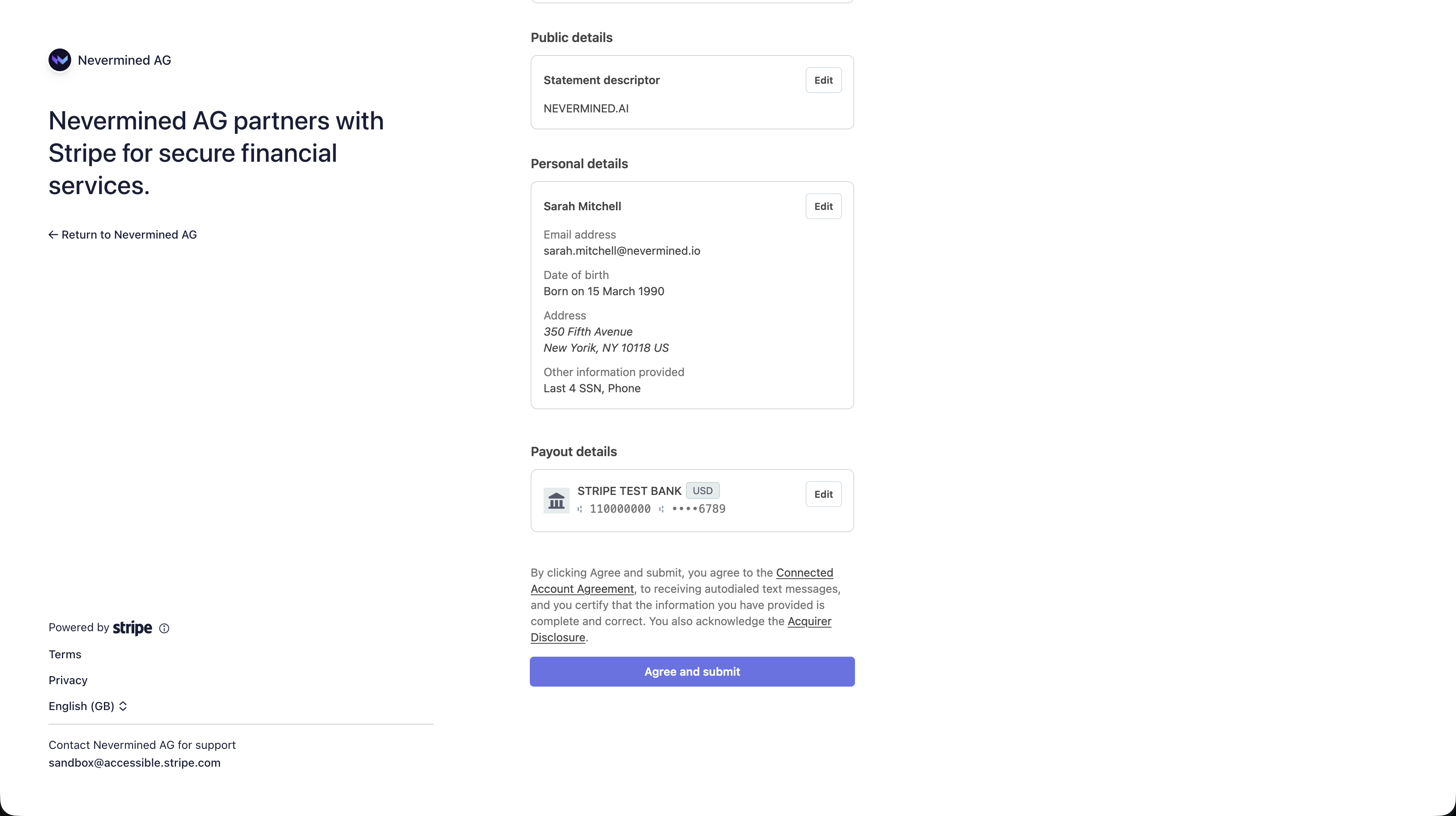
 Review everything and click **Agree and submit**. You'll be redirected back to the Nevermined App and see a "Stripe successfully connected" confirmation.
 No. If you don't have one, Stripe's onboarding flow will create a new account for you.
No. Only if you want to accept fiat (credit card) payments. Plans that only accept stablecoin or crypto don't need a Stripe account.
When a user pays with a credit card, Nevermined routes the payment to your connected Stripe account. Fees (Nevermined's 2% + Stripe's processing fees) are deducted automatically. Stripe handles the payout schedule to your bank.
Yes. Sandbox transactions use [Stripe test cards](https://stripe.com/docs/testing#international-cards), so no real money is charged. See the [full list of Stripe test values](https://docs.stripe.com/connect/testing?accounts-namespace=v2).
Yes. Go to **Settings > Stripe Connect** in the Nevermined App. Any pending payouts will still be routed to the previously connected account.
## General
Nevermined adds a payment and entitlement layer to any agent API or MCP tool. Each inbound request is validated, metered, and settled in real time. You handle the AI, we handle payments.
x402 is an open HTTP standard for agent payments. When an agent hits a paywall, the server responds with `402 Payment Required`. The agent attaches a payment credential in the next request header and the purchase completes in milliseconds. No checkout, no redirect.
Agents autonomously buy, sell, or rent services from each other. Nevermined's identity, metering, and payment infrastructure makes those machine-to-machine transactions possible.
AI agents fire thousands of micro-tasks and are OpEx heavy. You need per-request metering and real-time settlement. Seat-based pricing and traditional checkout flows can't keep up.
Stripe handles checkout but doesn't track sub-cent API calls. Nevermined adds per-request metering and settlement on top, while still letting you settle via Stripe or USDC. Stripe was built for monthly subscriptions and shopping carts. We're built for millions of micro-transactions between autonomous agents.
Any framework that can make an HTTP request: OpenAI, Anthropic, LangChain, CrewAI, Strands, MCP tool servers, and custom agents. We provide TypeScript and Python SDKs, a CLI, and an MCP server.
Usage-based bills per API call or compute cycle. Outcome-based charges only when your agent delivers a result (lead booked, bug fixed, etc.). Nevermined supports either model, or a hybrid, out of the box.
No. Registering an agent is a **seller** task — it's how you publish a service for others to pay for, which is why that flow asks for protected endpoints and a plan. As a **buyer** you don't register anything, expose endpoints, or create a plan. You need three things: a [Nevermined API key](/docs/getting-started/get-your-api-key) (created once via a one-time sign-in, then stored and reused — an agent can [capture it automatically](/docs/agents-guide/get-api-key)), a payment method with a spending delegation (a funded stablecoin wallet or an enrolled card, plus a capped budget the agent can charge — minting a token requires it), and the plan ID you want to buy. Then mint a token with `getX402AccessToken` and call the agent. See [Buy & Call a Paid Agent](/docs/getting-started/ai-agent-purchase).
## Related topics
- [API Providers](/docs/solutions/api-providers.md)
- [Certifications](/docs/products/payments/certifications.md)
- [Fiat Payments](/docs/integrate/patterns/fiat-payments.md)
No. If you don't have one, Stripe's onboarding flow will create a new account for you.
No. Only if you want to accept fiat (credit card) payments. Plans that only accept stablecoin or crypto don't need a Stripe account.
When a user pays with a credit card, Nevermined routes the payment to your connected Stripe account. Fees (Nevermined's 2% + Stripe's processing fees) are deducted automatically. Stripe handles the payout schedule to your bank.
Yes. Sandbox transactions use [Stripe test cards](https://stripe.com/docs/testing#international-cards), so no real money is charged. See the [full list of Stripe test values](https://docs.stripe.com/connect/testing?accounts-namespace=v2).
Yes. Go to **Settings > Stripe Connect** in the Nevermined App. Any pending payouts will still be routed to the previously connected account.
## General
Nevermined adds a payment and entitlement layer to any agent API or MCP tool. Each inbound request is validated, metered, and settled in real time. You handle the AI, we handle payments.
x402 is an open HTTP standard for agent payments. When an agent hits a paywall, the server responds with `402 Payment Required`. The agent attaches a payment credential in the next request header and the purchase completes in milliseconds. No checkout, no redirect.
Agents autonomously buy, sell, or rent services from each other. Nevermined's identity, metering, and payment infrastructure makes those machine-to-machine transactions possible.
AI agents fire thousands of micro-tasks and are OpEx heavy. You need per-request metering and real-time settlement. Seat-based pricing and traditional checkout flows can't keep up.
Stripe handles checkout but doesn't track sub-cent API calls. Nevermined adds per-request metering and settlement on top, while still letting you settle via Stripe or USDC. Stripe was built for monthly subscriptions and shopping carts. We're built for millions of micro-transactions between autonomous agents.
Any framework that can make an HTTP request: OpenAI, Anthropic, LangChain, CrewAI, Strands, MCP tool servers, and custom agents. We provide TypeScript and Python SDKs, a CLI, and an MCP server.
Usage-based bills per API call or compute cycle. Outcome-based charges only when your agent delivers a result (lead booked, bug fixed, etc.). Nevermined supports either model, or a hybrid, out of the box.
No. Registering an agent is a **seller** task — it's how you publish a service for others to pay for, which is why that flow asks for protected endpoints and a plan. As a **buyer** you don't register anything, expose endpoints, or create a plan. You need three things: a [Nevermined API key](/docs/getting-started/get-your-api-key) (created once via a one-time sign-in, then stored and reused — an agent can [capture it automatically](/docs/agents-guide/get-api-key)), a payment method with a spending delegation (a funded stablecoin wallet or an enrolled card, plus a capped budget the agent can charge — minting a token requires it), and the plan ID you want to buy. Then mint a token with `getX402AccessToken` and call the agent. See [Buy & Call a Paid Agent](/docs/getting-started/ai-agent-purchase).
## Related topics
- [API Providers](/docs/solutions/api-providers.md)
- [Certifications](/docs/products/payments/certifications.md)
- [Fiat Payments](/docs/integrate/patterns/fiat-payments.md)