

clientSecret the buyer’s browser confirms with their card. Nothing needs to exist in advance: no plan, no buyer Nevermined account, no delegation.
Orders live alongside plans; they don’t replace them. Use a plan for a reusable, catalog-listed service. Use an Order when you need to charge one buyer one specific total and move on.
An Order is not the same thing as ordering a plan.
orderPlan() / order_plan() buys credits on an existing plan for a Nevermined account. An Order has no plan and no account behind it.When to use an Order
Before you start
- An active organization account. Orders are available to organizations only. A personal API key is refused with
BCK.ORDER.0003. See Organizations. - A Nevermined API key scoped to that organization. The key identifies you as the Merchant of Record for every Order it creates.
- A validated Stripe Connect account. Nevermined looks for one on your organization first, then on the API key owner’s profile. Order revenue is paid out to it, the same way fiat plan payments are. Without one,
POST /api/v1/ordersfails withBCK.ORDER.0004. See the Payments FAQ for seller onboarding.
https://api.sandbox.nevermined.app while you build and https://api.live.nevermined.app when you go live.
How it works
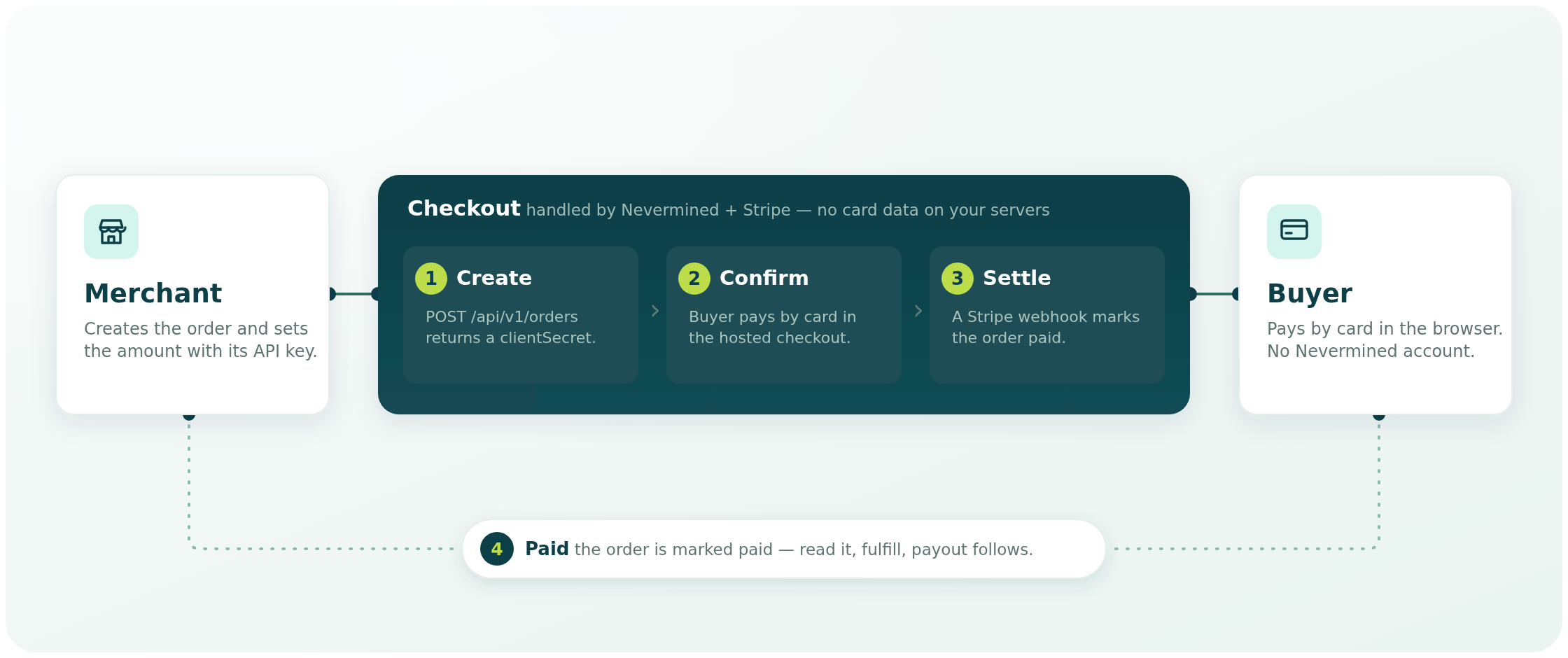
1
Create the Order from your server
Call
POST /api/v1/orders with your API key and the amount in USD cents. Nevermined creates a Stripe PaymentIntent for that exact amount and returns an unguessable orderId and a clientSecret. No money moves yet.2
Hand the buyer to the Nevermined checkout
Pass the buyer only the
orderId, by redirect or by embedding the Nevermined-hosted checkout. The checkout reads the Order through GET /api/v1/orders/{id} and renders the amount and the card form. You don’t build a card form or handle card data, and the buyer never signs in to Nevermined.3
The buyer confirms in the browser
Stripe Elements confirms the payment client-side against the
clientSecret, running 3D Secure if the issuer requires it. Nevermined only ever created the PaymentIntent; it never initiates the charge itself.4
The Order becomes paid
Stripe notifies Nevermined by webhook and the Order’s status flips to
paid. Read the Order from your server and confirm the status before you fulfill.The hosted checkout is the buyer-facing half of Orders. You don’t need your own Stripe Elements integration: the hosted checkout confirms the
clientSecret for you. Your side is the server-to-server REST contract on this page.Create an Order
POST /api/v1/orders is authenticated with your API key and is the only call that sets a price.
There is deliberately no field for a Stripe account, fee, or transfer destination. Nevermined resolves your Connect account server-side from the API key on every request, so a buyer-facing bug can never redirect a payout.
- curl
- TypeScript
- Python
201 Created:
clientSecret is what the buyer’s browser confirms against. In the standard flow you never touch it: the checkout fetches it from GET /api/v1/orders/{id}. It’s returned here so your server can log or reconcile the PaymentIntent, and it’s withheld once the Order stops being payable.
Read an Order
GET /api/v1/orders/{id} needs no authentication. The orderId is the access control, which is why it’s a long random id and must be treated like a bearer token: share it only with the buyer it belongs to, and don’t put it in logs or analytics. The endpoint is rate-limited per caller and returns Cache-Control: no-store.
metadata you attached. clientSecret is present only while the status is requires_payment and expiresAt has not passed.
Because the read is public, use it from your server as the source of truth before you fulfill: poll it after the buyer returns from checkout, and treat paid as the only status that means money moved.
Order statuses
An Order is payable for 24 hours by default. After
expiresAt the read stops returning clientSecret and the buyer can no longer pay it. Create a new Order instead.
Retries and idempotency
Network timeouts happen. Send anidempotencyKey (your own order id works well) and a retried POST /api/v1/orders with the same key returns the same orderId, and the same clientSecret while the Order is still payable, rather than creating a second charge. Behind it, Nevermined also pins the Stripe PaymentIntent to the Order, so a retry can never mint two PaymentIntents for one cart.
If you reuse a key with a different amount or currency, the call is refused with 409 BCK.ORDER.0007. Reusing it with the same amount and currency returns the original Order unchanged: the description, buyerRef, lineItems and metadata of the retried request are ignored, not merged. Generate a fresh key for a genuinely new Order.
Refunds and disputes
In Phase 1 there is no refund endpoint. Orders are charged on Nevermined’s Stripe platform account and paid out to your Connect account, so a refund is issued on the Stripe side by Nevermined rather than from your own Stripe Dashboard. Contact Nevermined to refund an Order. Once Stripe reports the refund by webhook, the Order moves torefunded or partially_refunded and amountRefundedMinor is updated.
Chargebacks are recorded, not managed. When a buyer disputes a charge, the Order moves to disputed. If the dispute is won, the Order returns to paid; if it is lost, it stays disputed. Evidence submission through Nevermined is a later phase; in Phase 1, work with the Nevermined team on any dispute.
Error codes
Every error uses the standard Nevermined error envelope. Branch oncode, not on the HTTP status alone.
A card decline never surfaces as an API error to your server. The buyer’s browser confirms the payment, so the decline is shown to the buyer in the checkout. Stripe then reports the failed attempt by webhook and the Order moves to
failed. Create a new Order if the buyer wants to try again.
Phase 1 limits
Server-side checkout by agents, a refund API, and dispute handling through Nevermined are later phases and are not available today.
Next steps
Fiat Checkout Chat tutorial
A worked Next.js + merchant-backend example of the Orders flow. Runs against a local Nevermined stack; see its prerequisites.
Fiat Payments
Card plans, delegations, revenue routing, and fees for the rest of the fiat rails.
Organizations
Set up the organization account and API key that Orders require.
API Errors
The error envelope, categories, and retry semantics used across the API.