

Three payment types
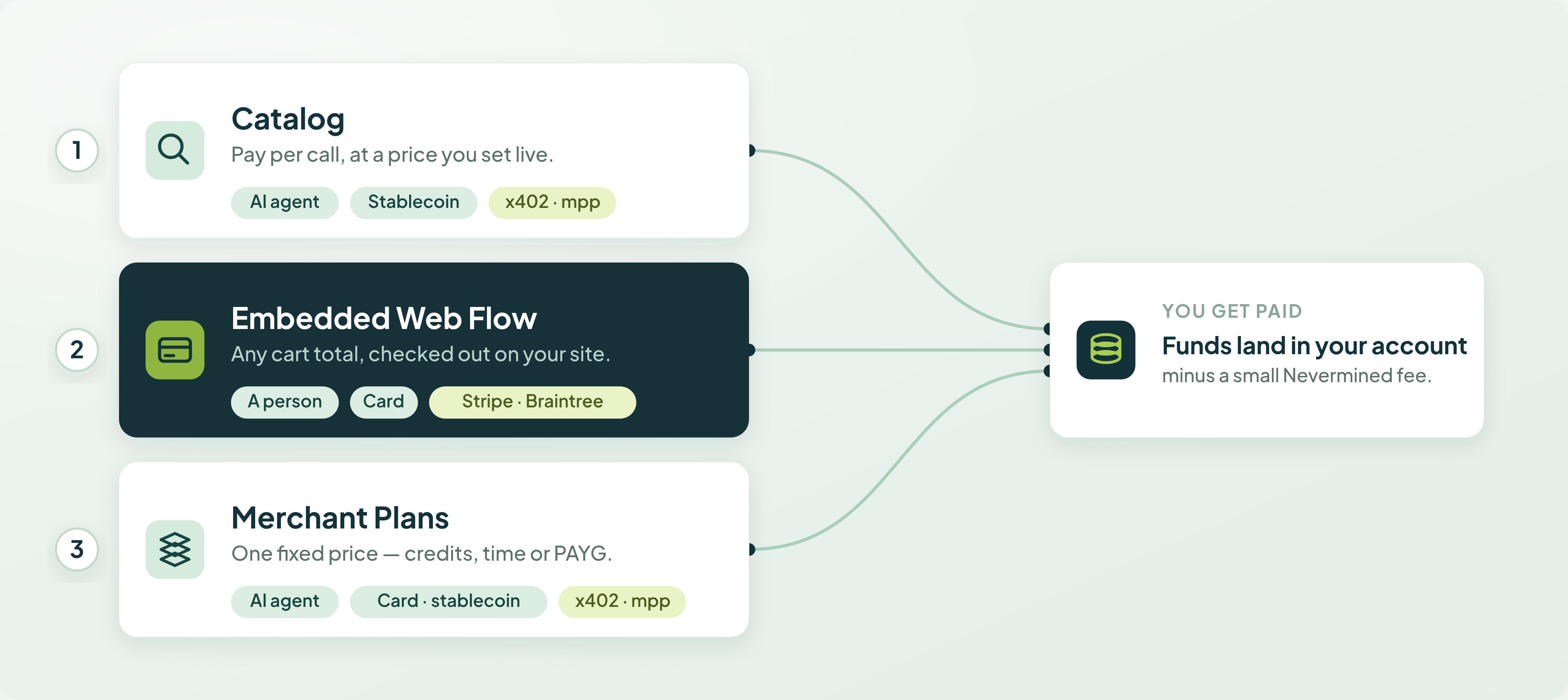
Catalog
AI agents discover your listed service and pay per call in stablecoin over x402 + mpp. You enroll nothing.
Embedded Web Flow
A person pays any cart total by card through a checkout embedded on your site. No plan, no buyer account, no delegation.
Merchant Plans
AI agents buy credits, time, or pay-as-you-go access to your service at a fixed price, paying by card or stablecoin.
The full comparison (rails, plans, buyer accounts, who integrates what) is on Monetize Your AI.
Card payments for agents
Everything below is the mechanism behind card-paid agent payments, which is how a Merchant Plan gets paid by card. Enroll a Visa, Stripe, or Braintree card. Create a delegation that caps how much can be spent. Your agents charge it directly via x402 — no checkout pages, no human in the loop.Three payment types and three card networks are different things. Catalog, Embedded Web Flow, and Merchant Plans are what you sell and who buys. Visa, Stripe, and Braintree are card networks: the providers an enrolled card and its delegation settle through. Delegations apply to Merchant Plans paid by card. The Embedded Web Flow settles through the same PSPs, but the buyer confirms each charge in the browser, so there is no enrollment and no delegation. Catalog payments are stablecoin and never touch a card.
Card Enrollment
Enroll Visa, Stripe, or Braintree cards
Delegations
Set spending limits and expiration
Delegation Selection
Auto-resolve which card to charge
How It Works
1
Enroll a card
Add a Visa, Stripe, or Braintree card at nevermined.app. Card data is tokenized in the browser by the provider’s PCI-compliant capture (VGS Collect for Visa and Stripe, Braintree Drop-in for Braintree). Nevermined never stores raw card numbers.
2
Create a delegation
Set the spending limit, duration, and (optionally) max transactions. Visa delegations also require a per-delegation passkey approval that binds the limits to your device. Optionally link the delegation to a specific API key for automatic routing.
3
Agents charge it
Agents call the Nevermined API with their API key. Nevermined resolves the right delegation and generates an x402 token. The resource server verifies, executes, and settles.
Payment Flow
One delegation model, three card networks
All three providers share the samenvm:card-delegation x402 scheme and the same POST /api/v1/delegation/create endpoint. The network field on the delegation (stripe, braintree, or visa) is set by the card you choose and routes settlement to the right PSP.
Visa
PAN tokenized by VGS Credential Management Platform (CMP) into a Visa Agentic Token. Each delegation requires a one-time WebAuthn/passkey device-binding ceremony enforced by Visa VTS. Settlement runs through Stripe Connect against the seller’s connected account.
Stripe
Card captured via VGS Collect and confirmed against a Stripe SetupIntent. No passkey. Settlement runs through Stripe PaymentIntents directly.
Braintree
Card captured via Braintree Drop-in, exchanged for a vaulted
paymentMethodToken. Settlement runs through transaction.sale against the seller’s per-currency OAuth-connected Braintree merchant account.The Visa Agentic Tokens flow replaces the earlier VTS/VIC + mandate endpoints. There is no longer a separate “mandate” object — a Visa delegation is just a
nvm:card-delegation record with provider: 'visa'.Key Concepts
SDK consumption
The TypeScript and Python SDKs treat all three networks identically. Pass thedelegationId to DelegationConfig and the SDK auto-resolves the scheme + network from the plan and the delegation record:
- TypeScript
- Python
Environments
- Sandbox — Testing and development. Visa runs against VGS sandbox + VTS test PANs; Stripe in test mode; Braintree on sandbox merchants.
- Live — Production. Real payments through Visa, Stripe, and Braintree.
You need an NVM API Key. Set it as
NVM_API_KEY.What’s Next?
Enroll a Card
Set up your first payment card
Create a Delegation
Define spending limits, usage caps, and expiration
Compare the three payment types
Catalog, Embedded Web Flow, and Merchant Plans side by side
Orders: Goods & Services Checkout
The Embedded Web Flow contract, and its current availability